
The best content ideas for a bakery are short videos of the moments people can almost smell: a loaf being scored, a tray coming out of the oven, a cake being finished for a customer's order. Post 15–30 second vertical videos with one bake or one step each, film your real bakes, and name the allergens when a video lists what's inside.
What short videos should a bakery post?
A bakery should post short videos that make people want to come in or place an order. Ten ideas:
- Out of the oven. One tray, no talking, the sound of the crust.
- Scoring the loaf. One cut pattern, shown slowly.
- Sourdough in 30 seconds. Mix, fold, proof, bake: the whole process as a time-lapse.
- What sold out first. The bake that went fastest, shown on the empty tray.
- Custom cake, start to finish. A celebration cake from sketch to box, shared with the customer's permission.
- Croissant layers explained. Why lamination makes layers, in plain words.
- How to store bread at home. How to keep a loaf fresh for longer.
- Meet the baker. Who starts the ovens and what they bake first.
- How to order a custom cake. Lead time, flavors, and how to book, using your real policy.
- Free-from range. What you make without certain allergens and how you keep it separate, only if that's true in your kitchen.
Ideas 6, 7 and 9 work as AI videos. Bakes, cakes and the oven (1, 2, 4, 5) need real footage, because customers order what they see.
What hooks work for bakery videos?
A good bakery hook uses a sound, a texture or a sell-out in the first two seconds. Lines to adapt:
- "Listen to this crust."
- "This is why croissants have layers."
- "This sold out in an hour." (only if it did)
- "Ordering a birthday cake? Read this first."
- "Keep your loaf fresh for longer with this."
What should a bakery ask the AI Advisor?
A bakery should ask the AI Advisor which bakes its viewers watch most and what to post next. Connect your YouTube and TikTok accounts, then ask in plain words:
- "Do my oven videos beat my cake videos?"
- "Which video got the most likes?"
- "Check my videos."
- "What should I post next?"
The AI Advisor uses the channels you connect and shows a basis line with every answer. If a channel isn't connected or is still syncing, it tells you instead of inventing numbers. Free includes 20 AI Advisor questions a month; paid plans include unlimited questions (fair use).
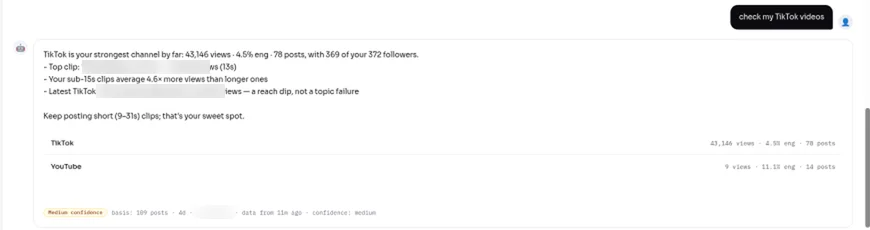
A real AI Advisor answer on a Viralflicks test account (a creator channel, not a bakery). The basis line shows its data.
How do you make a bakery video in Viralflicks?
You make a bakery explainer in Viralflicks in four steps: Brief → Storyboard → Rendering → Review.
- Brief. For example: "20 seconds, 9:16, for people who buy fresh bread. Topic: 3 ways to keep a sourdough loaf fresh at home. Warm voice, English."
- Storyboard. Read each scene and change anything that isn't how you bake. Changing the storyboard is free.
- Rendering. Credits are spent on the render, and failed videos refund automatically.
- Review. Approve, save as draft, or discard. The first 2 prompt edits are free; each one after costs 1 credit.
Approved videos can be published or scheduled to YouTube; TikTok gets a draft you post from the TikTok app.
How many bakery videos does each plan cover?
A 15-second AI Visual video costs 3 credits, so one quick explainer a week (4–5 a month, about 15 credits) fits the Creator plan alongside the bakes you film yourself:
- Free, $0: 5 credits a month (1 AI video).
- Creator, $19.99/mo: 35 credits, up to 8 AI videos at 30 seconds or 11 at 15 seconds.
- Pro, $39.99/mo: 80 credits, up to 20 AI videos at 30 seconds.
- Agency, $79.99/mo: 180 credits, up to 45 AI videos at 30 seconds.
Yearly: $179.91, $359.91 or $719.91 (Save 25%). Credits reset every 30 days and don't roll over.
What allergen details should a bakery video include?
A bakery video that lists ingredients should name the major allergens in the bake. US law identifies nine major food allergens: milk, eggs, fish, crustacean shellfish, tree nuts, peanuts, wheat, soybeans and sesame (FDA). Many bakes contain wheat, milk or eggs, so say so on screen or in the caption, and don't call anything "free-from" unless your kitchen process supports it. Add your best clips to your Google Business Profile too; photos and videos there show on Google once the profile is verified (Google Business Profile Help).
Bakery video FAQ
How long should a bakery video be?
15–30 seconds: one bake or one step, with the sound left in.
Can I make bakery videos without filming?
Yes, for tips and explainers. For your bakes, film them, so customers see the bread they will actually buy.
Can Viralflicks post my bakery videos?
Viralflicks can publish or schedule to YouTube; TikTok gets a draft that you post from the TikTok app.
What should a bakery post first?
Your best seller coming out of the oven, with its name and price on screen.
Related guides
Next step: Start free, connect your YouTube and TikTok accounts, and ask the AI Advisor which bakes your viewers watch most.
Written by Hanif Jadoon, Head of Growth & SEO at Viralflicks.