
The best content ideas for a restaurant are short videos that make one dish, one person in the kitchen or one reason to book feel real: the signature plate being finished, the chef's family recipe, the table everyone asks for. Post 15–30 second vertical videos with one idea each, and let your own views decide what you make next.
What short videos should a restaurant post?
A restaurant should post short videos that help someone decide where to eat. Ten ideas to start with:
- The plate in 10 seconds. Your signature dish going from pass to table, no talking, one caption.
- Chef's one rule. The single thing your kitchen won't change, and why.
- Where the recipe came from. The family, region or trip behind one dish.
- What to order on your first visit. Three dishes, in order, with prices that match your menu.
- The sauce, start to finish. One prep step that takes hours, shown in seconds.
- Date night or group dinner? Which tables suit which booking, filmed in your room.
- Spice level explained. What "medium" means in your kitchen, so nobody is surprised.
- Staff meal. What the team eats before service.
- How to eat it. The right way to eat a dish people find unfamiliar.
- Menu change countdown. The last week of a dish before the menu changes.
Ideas 3, 7 and 9 are explainers that work as AI videos. Ideas 1, 5 and 6 sell your real food and your real room, so film those on your phone.
What hooks work for restaurant videos?
A good restaurant hook promises a decision or a reveal in the first two seconds. Lines to adapt:
- "Order these 3 things on your first visit."
- "This dish takes 6 hours. Here it is in 10 seconds." (only with your real prep time)
- "You've been eating this wrong."
- "Our chef won't change this one thing."
- "Here is what medium spicy means here."
Keep one hook per video. Put it on screen and in the voiceover.
What should a restaurant ask the AI Advisor?
A restaurant should ask the AI Advisor which of its videos drew views and which to repeat. Connect your YouTube and TikTok accounts, then ask in plain words:
- "Which of my dish videos got the most views?"
- "Do my kitchen videos do better than my dining room videos?"
- "Check my videos."
- "What should I post next?"
Each answer comes from the channels you connect and shows a basis line, so you can see what it's based on. If a channel isn't connected or is still syncing, the AI Advisor says so rather than guessing. Free includes 20 AI Advisor questions a month; paid plans include unlimited questions (fair use).
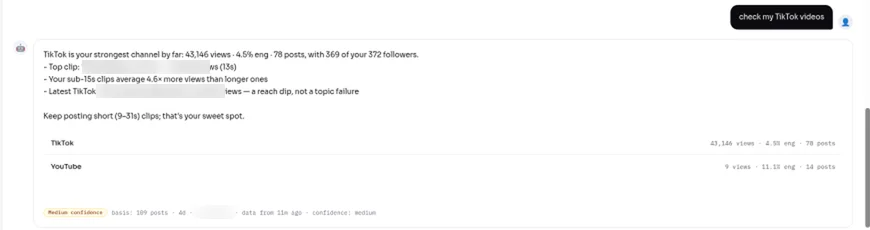
A real AI Advisor answer on a Viralflicks test account (a creator channel, not a restaurant). The basis line shows what the answer used.
How do you make a restaurant video in Viralflicks?
You make a restaurant video in Viralflicks in four steps: Brief → Storyboard → Rendering → Review.
- Brief. For example: "20 seconds, 9:16, for diners new to Sichuan food. Topic: what numbing spice is and why it isn't just hot. Warm voice, English."
- Storyboard. Check every scene and line. Changing the storyboard is free.
- Rendering. This is where credits are spent. Failed videos refund automatically.
- Review. Approve, save as draft, or discard. You get 2 free prompt edits at review, then each one costs 1 credit.
When it's approved, publish or schedule to YouTube; TikTok gets a draft you post from the TikTok app.
How many restaurant videos does each plan cover?
A 15-second AI Visual video costs 3 credits and a 30-second one costs 4, so a restaurant posting three 15-second explainers a week (about 12 a month, 36 credits) fits the Pro plan with room to spare:
- Free, $0: 5 credits a month (1 AI video).
- Creator, $19.99/mo: 35 credits, up to 8 AI videos.
- Pro, $39.99/mo: 80 credits, up to 20 AI videos.
- Agency, $79.99/mo: 180 credits, up to 45 AI videos, and unlimited channels for groups with several sites.
Yearly: $179.91, $359.91 or $719.91 (Save 25%). Credits reset every 30 days and don't roll over.
What should a restaurant check before posting a food video?
A restaurant should check that every dish, price and ingredient in a video matches what a guest will get. If a video names ingredients, mention the major allergens it contains: US law identifies nine (milk, eggs, fish, crustacean shellfish, tree nuts, peanuts, wheat, soybeans and sesame), per the FDA's food allergies page. Add your best clips to your Google Business Profile too, since photos and videos there show on Google once the profile is verified (Google Business Profile Help).
Restaurant video FAQ
How long should a restaurant video be?
A restaurant video works best at 15–30 seconds, one dish or one story per video.
Should restaurant videos show real food or AI images?
Show real food for anything a guest can order. Use AI videos for explainers, such as how to eat a dish or what a spice tastes like.
Can Viralflicks schedule my restaurant videos?
Yes on YouTube: publish or schedule to YouTube. TikTok gets a draft that you post from the TikTok app.
What should I post if my last video flopped?
Ask the AI Advisor "why did my last TikTok flop?" and compare it with your best video before you change your plan.
Related guides
- TikTok vs Reels vs Shorts: where should your business post first?
- Why Did My TikTok Views Drop? 9 Reasons to Check
Next step: Start free, connect your YouTube and TikTok accounts, and ask the AI Advisor which dish videos to make more of.
Written by Hanif Jadoon, Head of Growth & SEO at Viralflicks.