
Faceless YouTube Channel Ideas (and How to Make Them Stick)
Updated 22 Oct 2026
The best faceless YouTube channel ideas are niches you can explain without being on camera: tips, explainers, lists, myth-busting and short stories. Pick one you can make 30 videos about, choose one repeatable format, and add your own angle in every script so YouTube sees original work, not reused content.
Demand is real: "faceless youtube channel ideas" sits at 100–1K searches a month (Google Keyword Planner US, 19 Oct 2026).
What are the best faceless YouTube channel ideas?
The best faceless YouTube channel ideas are the 15 below, grouped by the format that suits them:
| # | Niche | Example video | Best format |
|---|---|---|---|
| 1 | Money tips | "3 budgeting rules for your first salary" | Listicle |
| 2 | Study tips | "How to revise in 25-minute blocks" | Steps |
| 3 | Productivity | "5 apps that replace a to-do list" | Listicle |
| 4 | History facts | "The shortest war in history" | Story |
| 5 | Science explainers | "Why the sky is blue, in 30 seconds" | Explainer |
| 6 | Health myths | "Myth vs fact: 8 glasses of water" | Myth vs fact |
| 7 | Language learning | "5 Spanish phrases for travel" | Listicle |
| 8 | Cooking basics | "3 ways to cook rice without a cooker" | Steps |
| 9 | Tech how-tos | "Free up phone storage in 4 steps" | Steps |
| 10 | Book summaries | "One idea from a book, explained" | Explainer |
| 11 | Motivation quotes | "A quote and what it means for you" | Quote + takeaway |
| 12 | Travel facts | "Places with unusual laws" | Listicle |
| 13 | Small business tips | "How to price your first product" | Tips |
| 14 | Pet care | "Signs your dog is bored" | Listicle |
| 15 | Career advice | "3 CV mistakes recruiters notice" | Myth vs fact |
How do I choose a faceless YouTube niche?
You choose a faceless YouTube niche by checking three things before your first upload:
- Can you list 30 video ideas in 10 minutes? If not, the niche is too thin.
- Can the idea be shown without a face? Stock footage, text on screen and a voiceover must carry it.
- Can you add something of your own? An opinion, a rule of thumb, an example from your life. That's what keeps the channel original.
Which faceless video formats work best?
The faceless video formats that work best are short, repeatable ones that a viewer recognises after two videos:
- Listicle: "3 / 5 / 7 things" with one point per scene.
- Steps: a how-to in numbered steps.
- Myth vs fact: state the myth, then the fact with a source.
- Explainer: one question, one answer, one example.
- Story: a short true story with a clear ending.
Keep one format per series so you can make videos faster and viewers know what to expect.
Can faceless YouTube channels be monetized?
Faceless YouTube channels can be monetized if the content is original. YouTube's channel monetization policies say reused content means repurposing content "without adding significant original commentary, substantive modifications, or educational or entertainment value", and the "inauthentic content" policy covers content that is "repetitive or mass-produced" (YouTube Help: channel monetization policies, checked 20 Oct 2026). YouTube also asks that you have the rights to commercially use every visual and audio element (YouTube Help: What kind of content can I monetize?, checked 20 Oct 2026).
Our reading: faceless is fine; copy-paste is not. Write your own script, vary your videos, and use footage and music you're allowed to use.
How do I make faceless YouTube videos with AI?
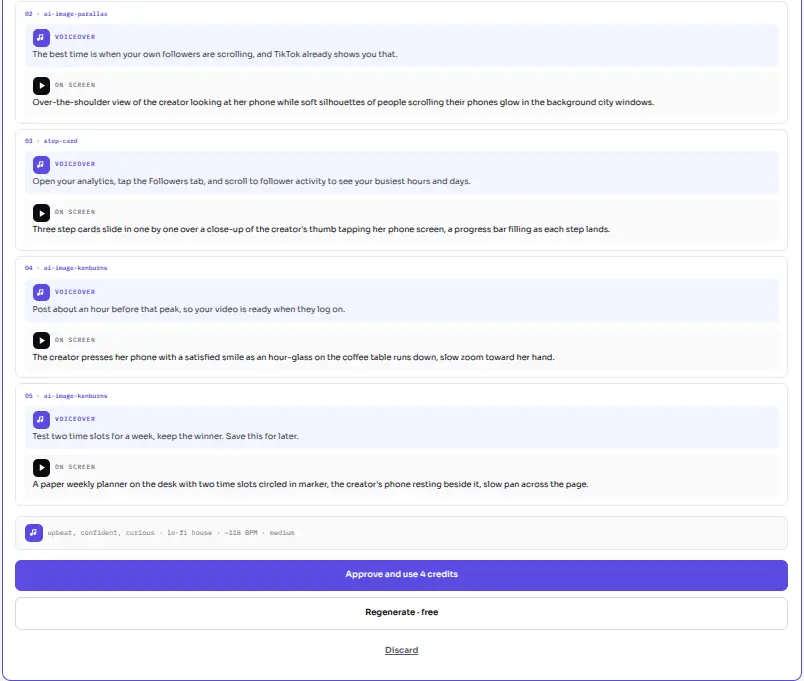
You make faceless YouTube videos with AI by writing a short brief and letting the tool draft the script and video, while you approve each step. In Viralflicks it works like this:
- Write a brief. For example: "Listicle: 3 budgeting rules for a first salary, friendly tone."
- AI writes the script from your brief. Regenerate it until it sounds like you.
- Approval 1: you approve the script. Credits are reserved only at this point.
- The video renders with stock footage (Pexels), and subtitles, background music and voiceover you can switch on or off.
- Approval 2: approve, save as draft, or discard the finished video.
Useful details for faceless channels:
- Formats: 9:16 included; 16:9 or 1:1 costs +1 credit each. Credit cost depends on video type and length (a 30-second AI Visual costs 4 credits).
- Voices: 5 English AI voices (US and UK). Scripts in English, Spanish or German (non-English on Creator plan or higher, or 1 free trial video).
- Publishing: publish or schedule to YouTube and Instagram; TikTok gets a draft you post from the TikTok app.
- Failed renders refund the credit automatically.
For the full approval flow, read Approve the script, then generate — human gates for AI video. For how TikTok drafts work, read TikTok Draft vs Direct Post — How Viralflicks Publishes. To see how other tools handle the same job, read Honest AI video tools compare — pick the job, not the buzzword. If you're weighing an editor, our guide "CapCut alternative" covers the trade-off.
How many videos do I need to start?
You need enough videos to post on a steady rhythm, not a big backlog. Our rule of thumb is a batch of 5–10 in one format before you judge a niche. On the Free plan you get 5 video credits a month; Creator gives 35 for $19.99 a month.
Make your first faceless short
Write a brief and approve your first faceless video. The Free plan includes 5 video credits a month.
By Hanif Jadoon, Head of Growth & SEO · Updated 22 Oct 2026
Frequently asked questions
Yes, if the content is original. YouTube's monetization policies reward original, authentic content and exclude reused content without significant original commentary, and mass-produced or repetitive content.
The easiest faceless YouTube channel idea is one you already know well, such as tips from your job or hobby, because you can write scripts quickly without heavy research.
No. You can use an AI voiceover or music with on-screen text. In Viralflicks you choose from 5 English AI voices (US and UK), or switch voiceover off and keep music.
Yes. The same short works in 9:16 on YouTube Shorts, TikTok and Instagram. Viralflicks lets you publish or schedule to YouTube and Instagram; TikTok gets a draft you post from the TikTok app.
See it in Viralflicks
Connect a channel, open Analytics, and ask the AI Advisor what to do next.