Later Alternative: Do You Need to Schedule or Decide?
Updated 17 Nov 2026
The right Later alternative depends on the job you need done: scheduling posts, or deciding what to post. Later is a social media scheduler and influencer marketing platform; if your gap is knowing what to make next on TikTok and YouTube, a tool that answers questions about your own channels, such as Viralflicks, fits that job better.
Quick answer: Keep Later (or another scheduler) if you plan and post across many platforms from one calendar. Add or switch to Viralflicks if you mainly post on TikTok and YouTube and want plain-word answers to "why did this flop?" and "what should I post next?", plus AI short videos you approve before they render.
Do you need help scheduling or deciding what to post?
You need help scheduling if posting on time across several networks is the hard part; you need help deciding if you have time to post but don't know what to make next. These are two different jobs, and most "Later alternatives" lists compare schedulers with other schedulers.
| Your problem | The job | What to look for |
|---|---|---|
| "I lose hours posting the same video to each app" | Scheduling | Visual calendar, multi-platform posting, team approvals |
| "My calendar is full but views are flat" | Deciding | Answers about your own videos, with the numbers they're based on |
| "I don't know what to post next" | Deciding | A next-video suggestion that shows what it's based on |
| "I need both" | Both | A scheduler plus an analytics tool that answers questions |
What does Later do?
Later describes itself as "Influencer marketing built for creators and trusted by brands. Run campaigns, manage social media, and track performance with AI-powered insights" (later.com, checked 17 Nov 2026). Its scheduler page says you can schedule to eight platforms, including Instagram, TikTok, Pinterest, LinkedIn, Threads, YouTube Shorts and Snapchat, from one visual calendar, with Best Time to Post built in (Later social media scheduler, checked 17 Nov 2026).
Later also lists analytics for reach, engagement and follower growth, with Custom Analytics and up to two years of history on its Scale plan (Later social media analytics, checked 17 Nov 2026), and AI tools for captions and content ideas (Later AI social media tools, checked 17 Nov 2026).
How does Viralflicks compare with Later?
Viralflicks compares with Later as a deciding tool rather than a scheduling tool: it reads your TikTok and YouTube channels and answers questions about them.
| Later (later.com, checked 17 Nov 2026) | Viralflicks | |
|---|---|---|
| Main job | Plan, schedule and analyze social content; influencer campaigns | Analytics + AI Advisor for TikTok and YouTube, plus AI short videos |
| Platforms | Eight listed on its scheduler page, from one calendar | YouTube and TikTok |
| Scheduling | Visual calendar, schedule up to 10 profiles at once | Publish or schedule to YouTube; TikTok gets a draft |
| Analytics history | Up to two years on the Scale plan | 28 to 90 days |
| Deciding what to post | AI Ideas, Caption Writer, Best Time to Post | AI Advisor: ask "why did this flop?" or "what should I post next?"; each answer shows its basis |
| Video content | Upload your own files or pull from Canva and Dropbox | AI short videos: brief → storyboard → render → review, two approvals |
| Free option | 14-day free trial | Free plan, $0 |
When is Later the better choice?
Later is the better choice when you post to many platforms and need one calendar, team approvals, a social inbox or influencer campaign tools. It also keeps more history on its Scale plan (up to two years) than Viralflicks' 28 to 90 days. Viralflicks doesn't offer a multi-platform calendar, a social inbox or influencer campaigns.
What does Viralflicks do differently?
Viralflicks answers the "what next?" question for TikTok and YouTube with its AI Advisor. Ask why a video flopped and what to post next — answered from your own channel data.
- One place for TikTok and YouTube: connect both and see them side by side (TikTok Analytics for Creators, Explained).
- AI Advisor with a basis line: ask in plain words, such as "check my videos" or "what should I post next?". Each answer shows what it's based on, and it won't invent numbers if a channel isn't connected or is still syncing (What to Post Next on TikTok & YouTube).
- AI short videos with two approvals: write a brief, approve the script, then approve the video before it goes out (Approve the Script, Then Generate AI Video). Writing or changing the storyboard is free; credits are spent on the render.
- Publishing: publish or schedule to YouTube; TikTok gets a draft you post from the TikTok app (TikTok Draft vs Direct Post Explained).
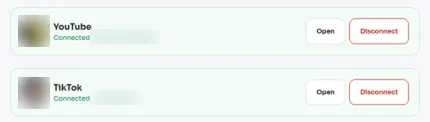
YouTube and TikTok connected on the Viralflicks Channels page (test account).
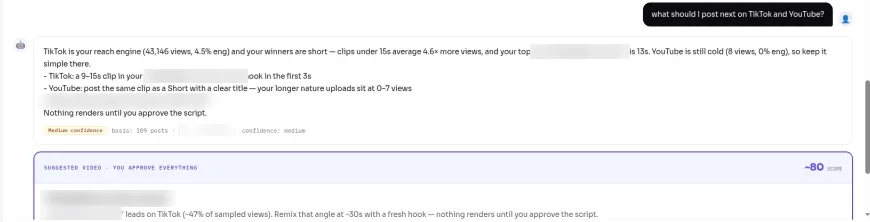
The AI Advisor's answer to "what should I post next on TikTok and YouTube?" names its basis (109 posts) and a Medium confidence label (test account).
How do you check what to post next in Viralflicks?
You check what to post next in Viralflicks by connecting your channels and asking the AI Advisor.
- Sign up free with email or Google.
- Connect your YouTube and TikTok channels.
- Open the AI Advisor and ask "what should I post next?".
- Read the basis line and confidence label under the answer before you act on it.
- If you want a video, write a brief, approve the script, then approve the video.
How much does Viralflicks cost?
Viralflicks costs $0 on the Free plan, with paid plans from $14.99 a month (viralflicks.ai pricing, checked 18 Nov 2026).
| Plan | Price / month | Video credits / month | Channels | AI Advisor |
|---|---|---|---|---|
| Free | $0 | 5 (1 AI video) | 3 | 20 questions / month |
| Creator | $14.99 | 35 (up to 8 AI videos) | 5 | Unlimited questions (fair use) |
| Pro | $32.99 | 80 (up to 20 AI videos) | 10 | Unlimited questions (fair use) |
| Agency | $73.99 | 180 (up to 45 AI videos) | Unlimited | Unlimited questions (fair use) |
Yearly billing: $161.89 / $356.29 / $799.09 (Save 10%). Fair use means up to 1,000 AI Advisor questions a month at full speed, then answers may be slower.
Which should you pick?
- You post to many platforms and need a calendar: Later or another scheduler.
- You post on TikTok and YouTube and need to know what to make next: Viralflicks.
- Both: decide in Viralflicks, then schedule your other platforms in Later.
Comparing more tools? See vidIQ Alternatives Compared: Free and Paid Options and AI Video Tools: InVideo vs CapCut vs Opus Clip.
Ask what to post next
Connect your TikTok and YouTube free and ask your AI Advisor what to post next.
By Hanif Jadoon, Head of Growth & SEO · Updated 17 Nov 2026
Frequently asked questions
Yes. Viralflicks has a Free plan at $0 with 20 AI Advisor questions a month, 5 video credits (1 AI video) and up to 3 channels. Later offers a 14-day free trial on its plans (later.com, checked 17 Nov 2026).
Partly. Later's AI tools include Caption Writer, content Ideas and Best Time to Post, which uses your past post data to suggest posting times (later.com, checked 17 Nov 2026). Viralflicks focuses on the question itself: ask the AI Advisor why a video flopped or what to post next, and each answer shows what it's based on.
Viralflicks can publish or schedule to YouTube; TikTok gets a draft you post from the TikTok app. It is not a multi-platform calendar, so if you schedule to many networks, keep a scheduler such as Later.
Viralflicks shows 28 to 90 days of history for your connected YouTube and TikTok channels.
Yes. Use Viralflicks to decide what to post next and Later to schedule it across your other platforms.
See it in Viralflicks
Connect a channel, open Analytics, and ask the AI Advisor what to do next.