TikTok Symphony vs Viralflicks: Ads Tool or Creator Tool?
TikTok Symphony is an ads tool: TikTok's suite of generative AI tools for marketers, built into Symphony Creative Studio and TikTok Ads Manager. Viralflicks is a creator tool: YouTube and TikTok analytics, an AI Advisor, and AI short videos you approve twice, first the script and then the finished video. If you run TikTok ads, Symphony is made for that job. If you post shorts as a creator, Viralflicks is made for yours.
What is TikTok Symphony?
TikTok Symphony is "our suite of generative AI tools", as TikTok puts it, made to help marketers create and optimize TikTok-first content (TikTok Newsroom, checked 10 Nov 2026). Four official facts:
- Generative tools for advertisers. Symphony's tools include Image to Video, Text to Video and Showcase Products with Digital Avatars. Image to Video turns an image and a short text prompt into "five-second, TikTok-first clips". TikTok says Symphony content "is automatically labeled as AI-generated" and goes through several rounds of safety review. The tools were announced for Symphony Creative Studio "to all global advertisers" (TikTok Newsroom).
- An AI chat agent for ads. Symphony Agent in Symphony Creative Studio "helps advertisers create high-performing TikTok ads in minutes through an AI-powered chat experience", combining brand goals with platform insights and performance signals (TikTok Newsroom: Cannes Lions 2026).
- Seedance 2.0 and Reference to Video. ByteDance's Dreamina Seedance 2.0 video model is integrated into Symphony, and Reference to Video lets advertisers prompt "the exact images and products they want at specific moments" of a video (TikTok Newsroom: TikTok World '26; TikTok Newsroom SG).
- Built into TikTok's ad tools. TikTok's Symphony page lists Symphony Creative Studio, Symphony Assistant (trends, TikTok-native scripts and creative concepts) and Symphony in Ads Manager, "natively integrated within TikTok Ads Manager" so creatives are campaign ready (TikTok for Business, checked 10 Nov 2026).
What is Viralflicks for?
Viralflicks is for creators who want to see what's working and make the next short with a human check at each step. It does three things:
- Analytics: connect YouTube and TikTok in one dashboard. YouTube shows views and watch time over time, traffic sources and the audience retention curve; TikTok shows per-video views, likes, comments and shares, with 28 to 90 days of history.
- AI Advisor: ask "why did this flop?" or "what should I post next?". Each answer shows a basis line with what it's based on.
- AI video with two approvals: write a brief, read the AI-written script and approve it before anything renders, then approve, save as draft or discard the finished video. Formats are 9:16, with 16:9 or 1:1 for 1 extra credit each.
Finished videos publish or schedule to YouTube; TikTok gets a draft in your TikTok inbox, and you post it from the TikTok app.
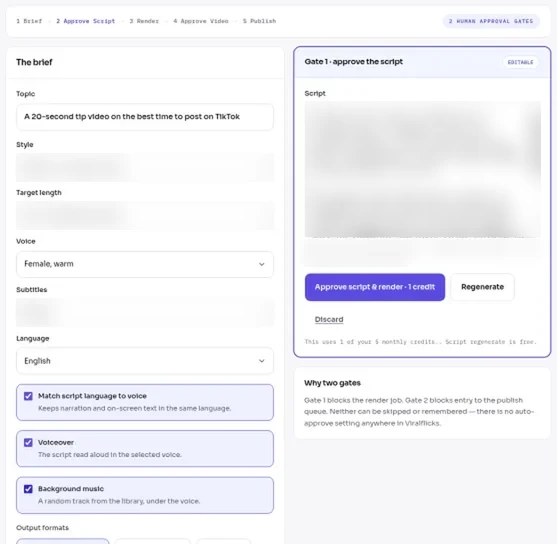
Approval 1: the brief form beside the AI-written script (test account).
How do TikTok Symphony and Viralflicks compare?
TikTok Symphony and Viralflicks compare as an ads tool and a creator tool: they start from different inputs and end in different places.
| TikTok Symphony | Viralflicks | |
|---|---|---|
| Made for | Advertisers and marketers | Creators posting shorts |
| Where it lives | Symphony Creative Studio and TikTok Ads Manager | Viralflicks web app |
| What you start with | An image, product or short text prompt; brand goals for Symphony Agent | A topic or brief |
| What it makes | TikTok-first ad clips (Image to Video clips are five seconds) | Short videos in 9:16, 16:9 or 1:1 |
| Review steps | Review suggested optimizations and edit assets in Ads Manager; TikTok runs safety review on Symphony content | Approve the script before render; approve, save as draft or discard the video |
| AI label | Applied automatically to Symphony content | You turn on the platform's AI label when you post |
| Where the video goes | TikTok ad campaigns | Publish or schedule to YouTube; TikTok gets a draft |
| Channel analytics | Not among Symphony's listed tools | YouTube and TikTok channel analytics plus the AI Advisor |
Symphony facts: TikTok Newsroom and TikTok for Business pages linked above, checked 10 Nov 2026. Prices aren't compared here.
Where is TikTok Symphony the stronger choice?
TikTok Symphony is the stronger choice when the video is a TikTok ad. It sits inside TikTok Ads Manager, it can put a product in the hands of a digital avatar, Reference to Video places exact products at specific moments, and TikTok labels the output as AI-generated for you. If your goal is a paid campaign on TikTok, those are features Viralflicks doesn't offer.
Where does Viralflicks fit better?
Viralflicks fits better when you're a creator posting organic shorts on YouTube and TikTok. You see both channels in one dashboard, ask the AI Advisor why a video flopped, and approve the script before any credits are spent on a render. The finished video can be scheduled on YouTube and lands as a TikTok draft, so you still choose when it goes live. More on that last step: TikTok Draft vs Direct Post — after Gate 2, you still own the click.
Which should I use: Symphony or Viralflicks?
Use Symphony if you run TikTok ads; use Viralflicks if you're a creator who wants analytics and script-approved shorts for YouTube and TikTok. Quick check:
- You have a TikTok Ads Manager account and a product to promote: start with Symphony.
- You post organic shorts and want to know what to make next: start with Viralflicks.
- You do both: use each for its own job.
People are looking: our autocomplete pull for "tiktok symphony" (Viralflicks, 2 Nov 2026, Google / YouTube / Bing, US + UK) returned 21 distinct suggestions, including "tiktok symphony creative studio", "tiktok symphony agent", "tiktok symphony ads" and "tiktok symphony seedance 2.0". Most point at the ads side of TikTok.
To compare more AI video tools by the job they do, read Honest AI video tools compare — pick the job, not the buzzword. For how the script approval works, see Approve the script, then generate — human gates for AI video.
Make a short you've approved
Start free with Viralflicks: write a brief, approve the script, then approve the video. The Free plan includes 5 video credits a month (1 AI video) and 20 AI Advisor questions a month.
By Hanif Jadoon, Head of Growth & SEO · Updated 10 Nov 2026
Frequently asked questions
TikTok Symphony is built for advertisers. TikTok describes it as its suite of generative AI tools for marketers, and its tools sit in Symphony Creative Studio and TikTok Ads Manager.
TikTok lists Image to Video, Text to Video and Showcase Products with Digital Avatars. Image to Video turns an image and a short prompt into five-second, TikTok-first clips, and Reference to Video lets advertisers place exact images or products at specific moments.
Viralflicks sends the video to your TikTok inbox as a draft, and you post it from the TikTok app. You can publish or schedule to YouTube.
Yes. You approve the AI-written script before anything renders, then approve, save as draft or discard the finished video. Writing or changing the script is free; credits are spent on the render.
Yes. They do different jobs: Symphony makes ad creative inside TikTok's ad tools, and Viralflicks helps a creator see what's working on YouTube and TikTok and make script-approved shorts.
See it in Viralflicks
Connect a channel, open Analytics, and ask the AI Advisor what to do next.