
The best content ideas for real estate agents are short videos that answer the questions buyers and sellers ask before they pick an agent: what a neighborhood is like, what a house really costs to buy, and what happens between offer and keys. Listing tours help, but local knowledge and plain explanations are what make people message you.
What short videos should a real estate agent post?
A real estate agent should post short videos that prove local knowledge and explain the process. Ten ideas:
- The 20-second listing tour. Front door to best room, ending on one detail buyers will remember.
- Street by street. One street or block, what it's close to, and what homes there usually look like.
- Closing costs explained. The costs buyers forget, in plain words, with figures only from your market and your own deals.
- Offer to keys. Each step after an offer is accepted, one per scene.
- What sellers should fix first. Three small jobs before photos.
- Open house in 30 seconds. The flow of a home you're showing, room by room.
- Buyer question of the week. One real question from a client, answered (no names).
- Myth vs fact. A common belief about buying or selling, corrected.
- What to ask at a viewing. A short checklist for first-time buyers.
- Sold story. How a home sold, told without private details and with the seller's permission.
Ideas 3, 4, 8 and 9 work as AI videos or as a Talking photo of you. Listing tours and street videos need real footage of the real property.
What hooks work for real estate videos?
A good real estate hook names a cost, a mistake or a place in the first two seconds. Lines to adapt:
- "First-time buyers forget these 3 costs."
- "What happens after your offer is accepted."
- "Don't paint before you list. Do this instead."
- "Here is what living on this street is like."
- "Ask this at every viewing."
What should a real estate agent ask the AI Advisor?
A real estate agent should ask the AI Advisor whether tours or explainers earn more views on its own channels. Connect your YouTube and TikTok accounts, then ask in plain words:
- "Do my listing tours get more views than my explainer videos?"
- "Which of my videos got the most comments?"
- "Check my videos."
- "What should I post next?"
The AI Advisor answers from the channels you connect and shows a basis line under each answer. If your channels aren't connected or are still syncing, it says so. Free includes 20 AI Advisor questions a month; paid plans include unlimited questions (fair use).
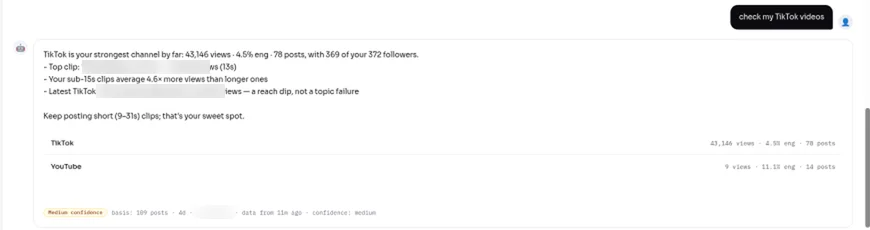
A real AI Advisor answer on a Viralflicks test account (a creator channel, not an agent). The basis line shows the data used.
How do you make a real estate video in Viralflicks?
You make a real estate explainer in Viralflicks in four steps: Brief → Storyboard → Rendering → Review.
- Brief. For example: "30 seconds, 9:16, for first-time buyers. Topic: the 5 steps between an accepted offer and getting the keys. Clear voice, English."
- Storyboard. Check every step against how deals work in your area. Changing the storyboard is free.
- Rendering. Credits are spent on the render. If it fails, credits refund automatically.
- Review. Approve, save as draft, or discard. 2 prompt edits at review are free, then 1 credit each.
Approved videos can be published or scheduled to YouTube; TikTok gets a draft you post from the TikTok app. Agents who want their own face on explainers without filming can use Talking photo (Creator plan and up).
How many real estate videos does each plan cover?
A 30-second Talking photo with the default engine costs 12 credits and a 30-second AI Visual video costs 4, so one Talking photo explainer and one AI explainer a week (about 64–70 credits a month) fits the Pro plan:
- Free, $0: 5 credits a month (1 AI video, AI Visual only).
- Creator, $19.99/mo: 35 credits, up to 8 AI videos, adds Talking photo.
- Pro, $39.99/mo: 80 credits, up to 20 AI videos.
- Agency, $79.99/mo: 180 credits, up to 45 AI videos, unlimited channels for teams that run several agent channels.
Yearly: $179.91, $359.91 or $719.91 (Save 25%). Credits reset every 30 days and don't roll over.
What should a real estate agent check before posting?
A real estate agent should check that a video describes the home and the area, not who should live there. The US Fair Housing Act bans housing discrimination because of race or color, religion, sex, national origin, familial status or disability (US Department of Justice), so avoid lines like "perfect for young professionals" or "no kids nearby". Get the seller's permission before filming inside a home, and keep house numbers and personal items out of shot.
Real estate video FAQ
How long should a listing video be?
20–30 seconds for a short-form tour: front door, best room, one memorable detail. Longer walk-throughs belong on a full YouTube video.
Can I make real estate videos without filming?
Yes, for explainers such as closing costs or the steps after an offer. Listings need real footage.
Can Viralflicks post my real estate videos?
Viralflicks can publish or schedule to YouTube; TikTok gets a draft that you post from the TikTok app.
How do I know which videos bring leads?
Start by asking the AI Advisor which videos got the most comments and shares, then repeat that topic.
Related guides
- TikTok vs Reels vs Shorts: where should your business post first?
- Myth vs Fact Video: Finance and Education Examples
Next step: Start free, connect your YouTube and TikTok accounts, and ask the AI Advisor whether your tours or your explainers earn more views.
Written by Hanif Jadoon, Head of Growth & SEO at Viralflicks.