
What "Other" and "Personal Profile" Mean in TikTok Analytics
"Other" in TikTok analytics is every view that didn't come from one of TikTok's named traffic sources. TikTok's Creator Academy lists those sources as the For You feed, the Following feed, sound pages, profile pages, search and direct messages, and says: "Everything else is grouped into 'Other.'" "Personal profile" most likely matches TikTok's "profile pages" source (our reading): views that started on your profile.
What do TikTok's traffic source labels mean?
TikTok's traffic source labels show where viewers found your post. Here is each label next to TikTok's own wording (TikTok Creator Academy, Using analytics as a tool to improve video performance, checked 20 Oct 2026):
| Label in your analytics | TikTok's wording | What it tells you (our reading) |
|---|---|---|
| For You | "the For You feed" | TikTok recommended the post to people who don't necessarily follow you |
| Following | "the Following feed" | Your followers saw it in their Following feed |
| Personal profile | "profile pages" | Someone opened your profile, then played the post from there |
| Search | "search" | The post came up for something a viewer typed into TikTok search |
| Sound | "sound pages" | Viewers found it through the sound you used |
| Direct messages | "direct messages" | Someone sent your post to a viewer in a DM |
| Other | "Everything else is grouped into 'Other.'" | Any route outside the six named sources |
The left column uses the label names creators see and search for; the middle column is TikTok's own wording.
What does "Other" mean in TikTok analytics?
"Other" in TikTok analytics means the view came from a route that isn't one of TikTok's named sources. TikTok doesn't publish a list of what's inside "Other". It only says that everything outside For You, Following, sound pages, profile pages, search and direct messages is grouped there.
So read "Other" as "not one of the named routes", not as a single place. If you shared a post somewhere outside those routes, it could plausibly land there, but that's our reading, not TikTok's definition.
Is "Other" traffic bots or a glitch?
"Other" traffic is not described by TikTok as bots or a glitch. Some forum answers guess "Other = bots", but TikTok's own description is simply "everything else". A large "Other" share on its own tells you nothing bad about the post.
What does "Personal profile" mean in TikTok analytics?
"Personal profile" in TikTok analytics means the view most likely started on your profile page. TikTok lists "profile pages" as a traffic source but doesn't define the "Personal profile" label, so this mapping is our reading. A viewer landed on your profile (from another video, a link in bio, or a search for your name) and tapped this post.
Our reading: a high Personal profile share suggests people come looking for you, not only for one video, so your pinned posts and bio do more of the work.
Should I worry about a high "Other" or "Personal profile" share?
You shouldn't worry about a high "Other" or "Personal profile" share by itself. Use this checklist instead:
- Compare the post with your last 10. One post with a big "Other" share is noise. A pattern across posts is worth a look.
- Check For You next to it. If For You dropped at the same time, the question is reach, not "Other".
- Check the retention rate. TikTok says retention rate helps you "find the moment viewers stop watching" (TikTok Creator Academy, Using analytics as a tool to improve video performance, checked 20 Oct 2026).
- Look at Search queries. If Search grew, reuse those words in your captions, as TikTok suggests.
For reach drops, our guide Why did my TikTok views drop? 9 reasons to check goes through the checks one by one.
What does "Search" mean in TikTok analytics?
"Search" in TikTok analytics means the viewer found your post through TikTok search. It counts views, not the searches themselves. To see which words led there, open "Search queries".
What does "Search queries" mean in TikTok analytics?
"Search queries" in TikTok analytics shows what viewers searched before finding your post. TikTok says this data covers the last 90 days, and suggests using a matching query in the captions of related videos (TikTok Creator Academy, Using analytics as a tool to improve video performance, checked 20 Oct 2026).
What does "Direct messages" mean in TikTok analytics?
"Direct messages" in TikTok analytics means the view started from a post someone shared in a DM. TikTok lists direct messages as its own traffic source, so these views don't fall into "Other".
What does "Shares" mean in TikTok analytics?
"Shares" in TikTok analytics is the number of times people shared your post. TikTok groups it with likes and comments as engagement, and suggests checking engagement right after retention rate.
What do "Post views" and "Profile views" mean in TikTok analytics?
"Post views" in TikTok analytics is the views of your posts in the date range you pick, and "Profile views" is the visits to your profile in that range. Both sit on the Overview tab with likes, comments and shares (TikTok Creator Academy, Introducing TikTok analytics, checked 20 Oct 2026).
Don't mix up "Profile views" with "Personal profile": the first counts profile visits, the second counts post views that started on your profile.
Where do I find traffic sources in TikTok?
You find traffic sources in TikTok Studio under Analytics. The account-level "Traffic source" section is on the Overview tab. For one post, open the Content tab and tap the post: TikTok says each post shows its retention rate, traffic sources and viewer information (TikTok Creator Academy, Using analytics as a tool to improve video performance, checked 20 Oct 2026).
TikTok's legal page on analytics says the source of content views is part of the engagement data it logs, "e.g. For you tab, Following tab, Search" (Information about TikTok Analytics, checked 20 Oct 2026).
How are TikTok traffic sources different from YouTube's?
TikTok and YouTube traffic sources both end in a catch-all bucket. YouTube's Shorts report shows "how your viewers found your Shorts within Shorts feed, YouTube search, channel pages, browse features, external, and others" (YouTube Help: Understand your content performance, checked 20 Oct 2026).
| What you want to know | TikTok label | YouTube Shorts label |
|---|---|---|
| Recommended by the feed | For You | Shorts feed |
| Found through search | Search | YouTube search |
| Came from your profile or channel | Personal profile | Channel pages |
| Everything else | Other | Others |
How do I check this in Viralflicks?
In Viralflicks you see per-video TikTok views alongside YouTube traffic sources. Viralflicks doesn't show TikTok traffic sources. For those labels, use TikTok Studio as described above.
What Viralflicks shows:
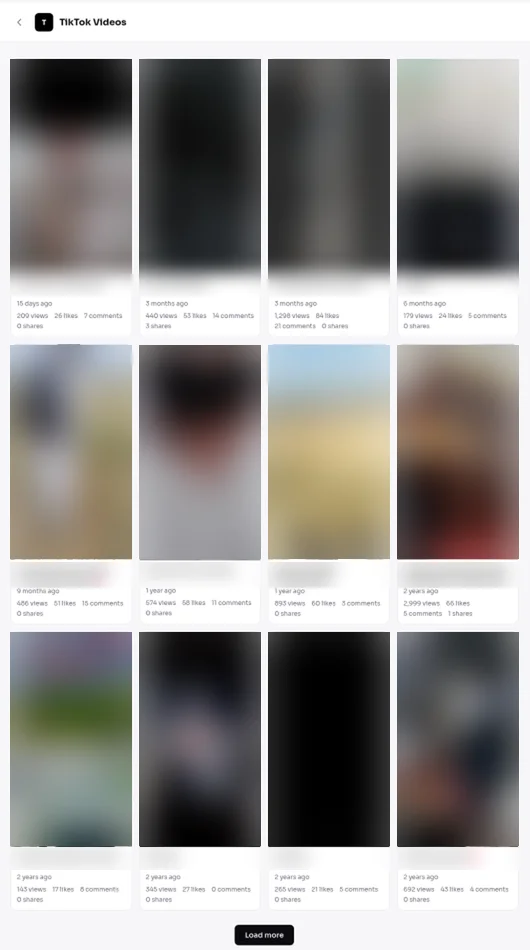
- TikTok: your profile, followers and a video list with per-video views, likes, comments and shares.
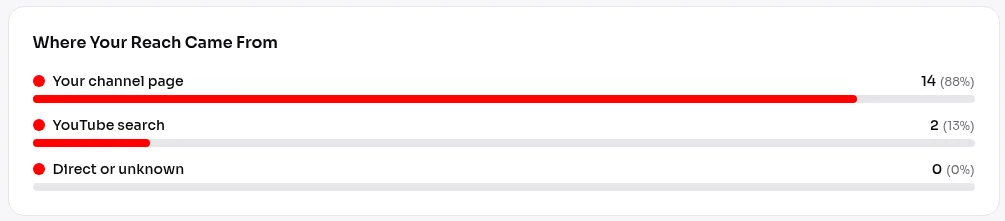
- YouTube: channel stats, views and watch time over time, traffic sources, top videos, per-video stats and the audience retention curve.
- Instagram: your Instagram analytics in the same dashboard.
- AI Advisor: ask "check my videos" or "why did this flop". Each answer shows a basis line with what it's based on.
To set it up, follow How to connect TikTok analytics to Viralflicks. For a wider tour, read TikTok analytics for creators — without the guesswork and Track TikTok, Instagram & YouTube analytics in one place. If your numbers show 0 or don't move, our guide TikTok analytics not updating or showing 0? How to fix it covers the fixes.
Why do people ask about these labels?
People ask because these labels sit right next to their numbers with no explanation in the app. Our autocomplete pull (Viralflicks, 19 Oct 2026, Google / YouTube / Bing, US + UK) returned 29 variants on "what does other mean in tiktok analytics", including "…search", "…shares", "…direct messages", "…post views" and "…personal profile". This page answers each of those.
See your numbers in one place
See per-video TikTok views alongside YouTube traffic sources. The Free plan connects up to 3 channels.
By Hanif Jadoon, Head of Growth & SEO · Updated 27 Oct 2026
Frequently asked questions
No. TikTok describes "Other" as everything that doesn't fit its named sources. It isn't a warning label. Compare it with your For You share and your retention rate before you change anything.
TikTok doesn't say that. Its Creator Academy only says that views outside the named sources are grouped into "Other". Treat claims that "Other" equals bots as guesses.
Profile views counts visits to your profile. Personal profile is a traffic source: views of a post that, in our reading of TikTok's "profile pages" source, started on your profile page.
No. Viralflicks shows your TikTok profile, followers and per-video views, likes, comments and shares, and it shows traffic sources for YouTube. Check TikTok traffic sources in TikTok Studio.
See it in Viralflicks
Connect a channel, open Analytics, and ask the AI Advisor what to do next.